Seeing What AI Actually Searches
ChatGPT only tells you "searching the web". Behind that line it fires several real search queries, rewritten from your words into proper search strings. You can read them straight from your browser. This guide shows you how, what those queries reveal about optimizing for topics instead of keywords, and how to do the same for Claude.
Validated on ChatGPT 5.6, July 2026. Several articles claim this stopped working after GPT-5.3. It did not. The data moved to a different network channel, it was not removed. We walk through exactly where it went.
Paste into your AI chat
Copy the whole guide as markdown to use as context in Cursor, Claude, ChatGPT, or any AI tool.
Why this is worth doing
A prompt is not one search. It fans out into a batch of sub-queries, and reading them is a content-coverage checklist you cannot get any other way.
Prerequisite: Chrome or Firefox, not Safari
The key step is a search across every network response at once. Safari's Web Inspector cannot do it.
The method, step by step
Ask a question, ignore the obvious request, then use DevTools global search to find the queries.
Step 1 and 2: ask a question that forces a live search
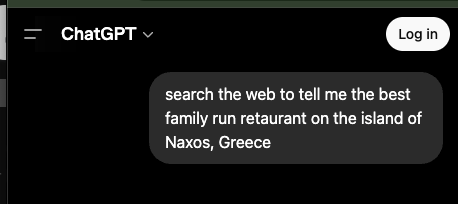
Open the ChatGPT site in Chrome, open DevTools (F12 or Cmd+Option+I), and go to the Network tab. Then ask something current enough to trigger a real web search, and wait for it to finish.
Step 3: the obvious request is a decoy
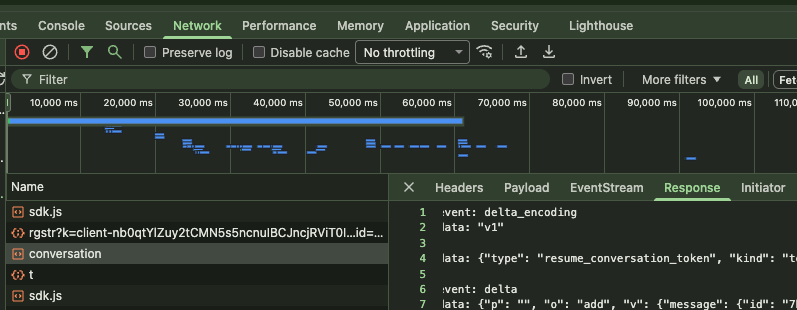
Click the request named conversation and read its Response and you will mostly see a stream_handoff token, not the queries. In ChatGPT 5.6 the answer streams over a separate channel (a resume SSE endpoint or a WebSocket), so inspecting that single request misses the data. This handoff is exactly why people thought the trick broke after GPT-5.3.
Step 4 and 5: use global search
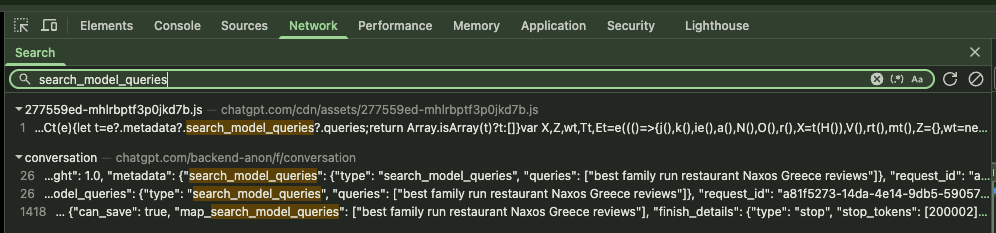
Press Cmd+Option+F (Mac) or Ctrl+Shift+F (Windows/Linux), or open the Search tab (the magnifying glass) in DevTools. Search for search_model_queries. You get hits in two places: a JavaScript bundle where ChatGPT’s own frontend reads the field (proof it is live), and the conversation resource holding the real data.
Step 6: read the array
The value at metadata.search_model_queries.queries is the fan-out. That is what you came for.
"metadata": {
  "search_model_queries": {
    "type": "search_model_queries",
    "queries": ["best family run restaurant Naxos Greece reviews"]
  }
}
Yes, it still works (the 5.3 myth)
Several articles claim the queries vanished after GPT-5.3. Validated hands-on on 5.6, the field is alive. The streaming moved, the data did not.
Doing the same for Claude
Claude shows its search queries in the UI, so you rarely need the trick. The network equivalent is a web_search tool-use block.
What to actually do with the queries
The queries are a coverage map, not a keyword list. Optimize for the topics they reveal.
Caveats
Read these before you rely on it.
- Chrome, Edge, Brave, Arc, or Firefox only. Safari cannot do the global search step.
- OpenAI can change the field name or structure at any time. This was validated on ChatGPT 5.6 in July 2026.
- The exact queries vary between runs. Look for patterns across a few attempts, not one perfect list.
Earlier in this track
New to why any of this matters? Start with the mental model.
How AI search works, why one prompt becomes many searches, and why getting cited is a probability rather than a ranking.
Want the steps as context for your AI coding assistant?